
Mango is an AI marketing team you hire as agents. You give it your goals, brand context, and connected accounts; it drafts the posts, creates the videos, schedules the work, and publishes across your social accounts from one workspace.
This guide is written for your first useful day in Mango. The goal is not to configure every setting. The goal is to get one agent live, give it enough context to make good work, and leave with either a draft, a video, or a recurring marketing workflow.
The 10-minute version#
If you only have ten minutes, do this:
- Sign up and enter your website, company, or best social profile.
- Deploy your first agent.
- Tell Mango what you sell, who you sell to, and what you want more of.
- Ask for one concrete piece of content, not a vague strategy.
- Save the best output into a schedule or automation so it can happen again.
The rest of this page explains that same flow with real product screens and better examples.
1. Create your account#
Sign up at app.mangoagent.ai. Your account starts with a workspace. Think of the workspace as the home for your agents, connected accounts, sessions, custom pages, automations, and schedules.
The first onboarding question asks for a website, social profile, or company name. Give Mango the best source of truth you have. A website is great. A strong Instagram, TikTok, YouTube, or X profile works too.
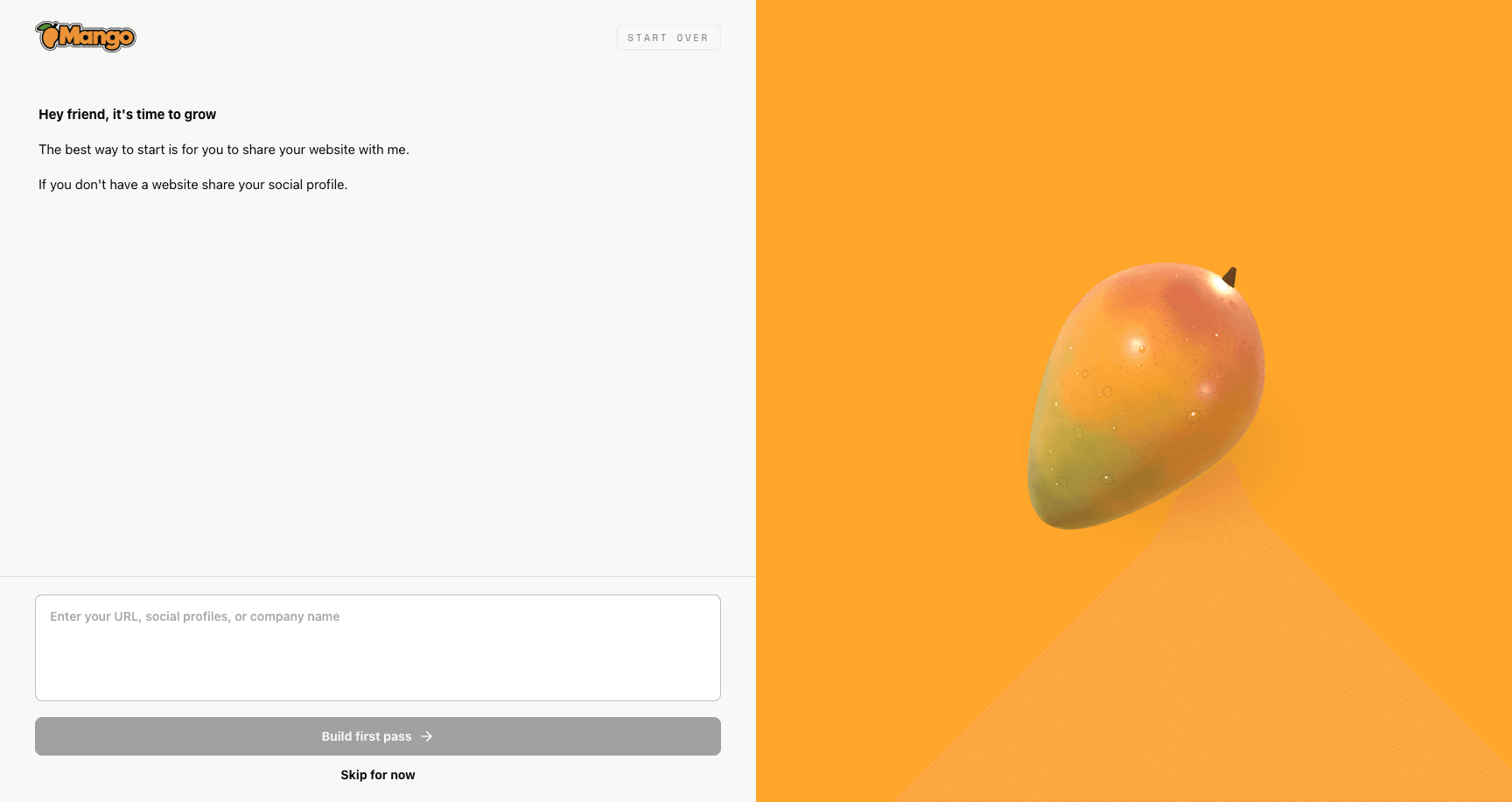
Start with the place that best explains what you do. Mango uses that context to make the first strategy pass less generic.
Useful inputs:
- Your company website:
https://yourcompany.com - Your best social profile:
https://www.instagram.com/yourbrand - A short company description:
We sell meal-prep kits for busy parents in Austin
If your brand is early and you do not have much online yet, write the clearest one-sentence version of what you are building. You can improve the strategy later.
2. Deploy your first agent#
Nothing useful runs until an agent exists. From the sidebar, open Agents and choose Deploy Agent. If you already run your own agent elsewhere, use Import Agent instead.
An agent is the AI operator doing the work in your workspace. You can assign it accounts, connectors, schedules, and responsibilities. That matters because Mango is not just a chat box; the agent can turn good ideas into recurring work.
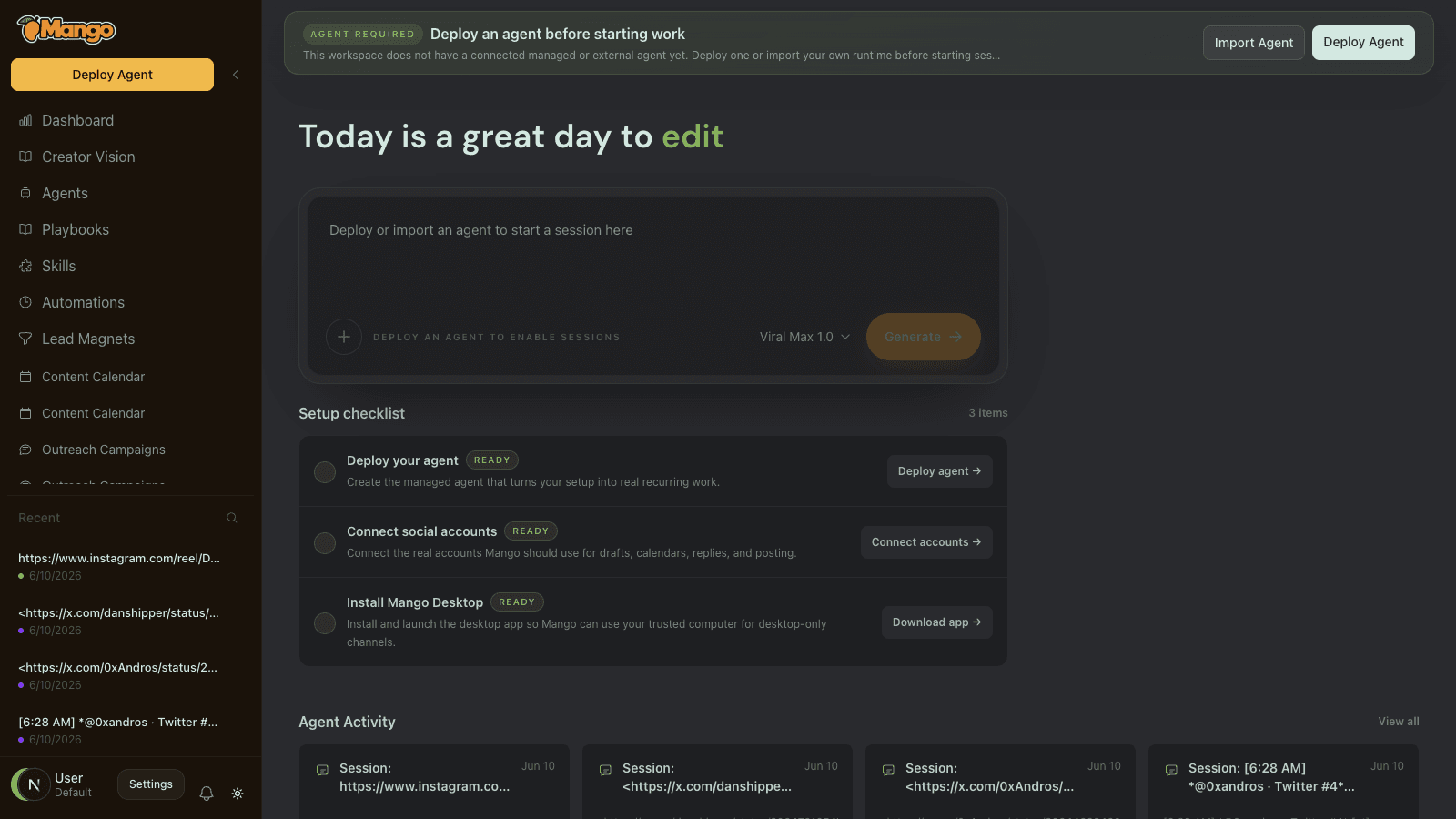
The setup checklist shows the three things that make Mango useful: deploy an agent, connect accounts, and install the desktop app when a channel needs it.
After the agent is deployed, you should be able to start sessions, run skills, and build automations. If a button is disabled, look for the banner at the top of the app. It usually tells you what setup step is missing.
3. Connect your accounts#
Head to Settings > Accounts to connect the social profiles your agent will post to. Mango supports Instagram, TikTok, X (Twitter), YouTube, Threads, Bluesky, Pinterest, LinkedIn, Telegram, and Snapchat.
Depending on the platform, you will connect through a hosted login, by syncing your existing browser session with the Mango browser extension, or by pasting session cookies. See Connecting Accounts for the details on each method. Your passwords are never stored or transmitted.
You can start creating content before connecting anything. You just cannot publish until at least one account is linked.
Founder tip: connect the account where you already have the clearest audience first. One real channel with clear context is better than connecting every platform before you have a strategy.
4. Start your first session#
Click New Session at the top of the sidebar. A session is a chat with your agent: the core surface where work happens.
Talk to it naturally, but be specific. The best first prompt gives Mango a target, a format, and a constraint.
Good first prompts:
- Paste a link to a video or post you like and ask Mango to remix it for your accounts.
- Describe the outcome: "Make a 20-second vertical video introducing my meal-prep app. Lead with a parent pain point. Keep it punchy, captions on."
- Attach media: upload footage, screenshots, audio, or product shots and tell Mango what to build from them.
The composer has a skill picker if you want to steer the output: AI Video, Story Video, Talking Head, Remix Clip, Short-Form Strategist, and more. Leave it on the default (Viral Max) and Mango picks the best lane for your request. While it works, the pipeline panel on the right shows each generation step in real time.
Less useful first prompt:
Make me content.
Much better:
I run a bookkeeping service for solo dentists. Make three short-form video ideas that explain why tax season is more expensive when books are messy. Give each idea a hook, a 20-second script, and a caption.
5. Turn the first win into a repeatable workflow#
A useful Mango setup does not stop at one chat. Once Mango understands your business, use automations to make the work repeat.
During setup, Mango can suggest recurring automations based on your company, goals, and playbooks. Pick the jobs that would actually save you time: daily content ideas, a weekly growth report, a lead radar, a calendar filler, or a warm outbound draft queue.
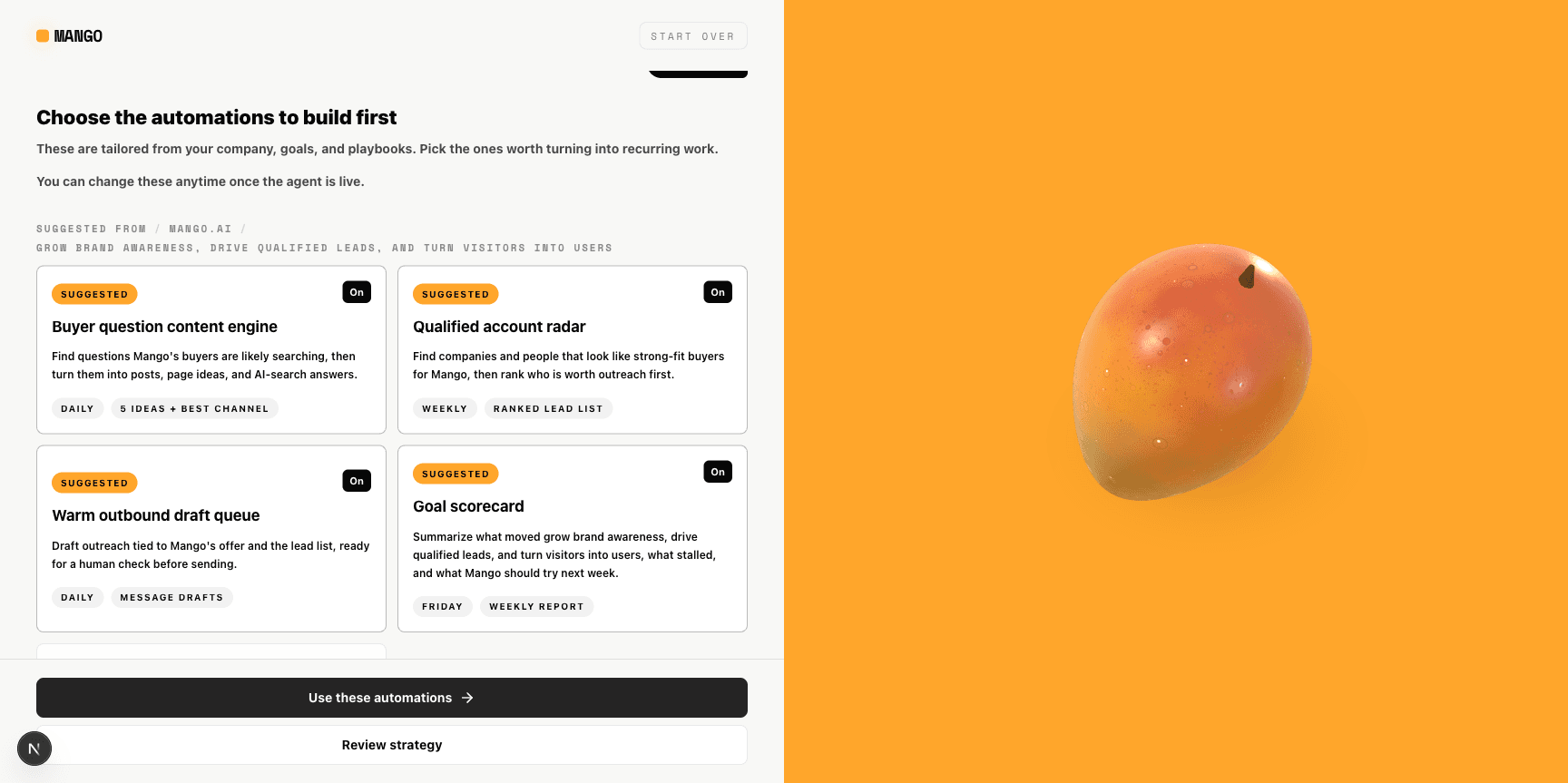
Pick automations that match the business result you want. If your goal is leads, start with lead radar or outbound drafts. If your goal is awareness, start with content ideas and calendar filler.
You can also open Automations later and choose from templates. This is where Mango starts feeling less like a generator and more like an operator.
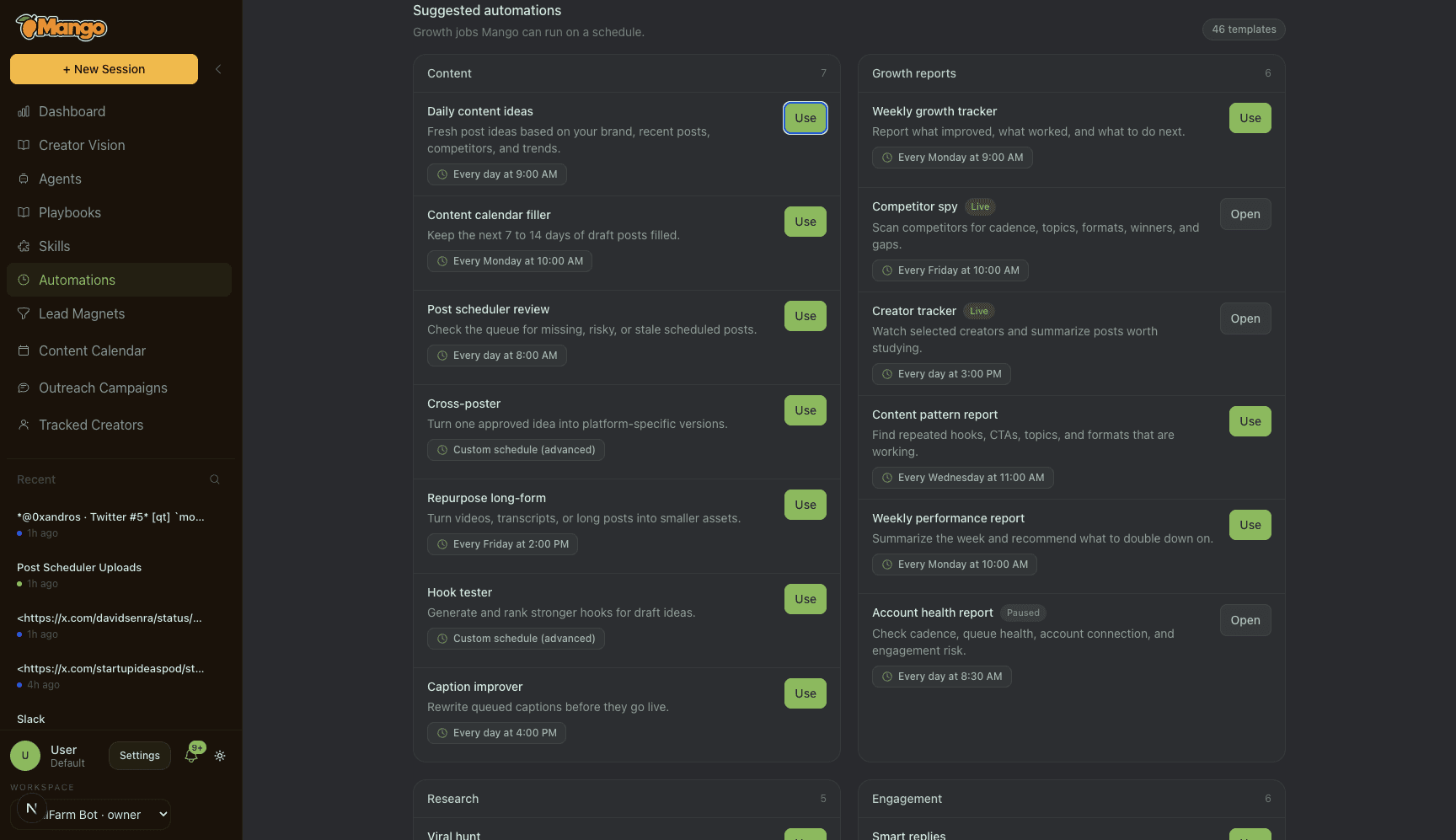
Automations are recurring jobs. Use them for work you know should happen every day or every week.
6. Edit, approve, and publish#
Click any video in the chat to open the built-in editor. You can trim, add subtitles and text overlays, crop, change aspect ratio, swap in music or a voiceover, adjust speed, and export without opening another editing tool. See Creating Content for the full toolset.
Once you're happy with a piece of content, your agent can post it immediately or add it to a schedule. Open your Content Calendar page to see planned slots, or set up recurring output in Automations so the agent keeps producing on cadence without being asked. See Scheduling & Autoposting.
Approvals are your control layer. Keep approvals on while you are learning how the agent writes and edits. Once you trust a workflow, you can let certain schedules run with less review.
7. Build pages for the work you repeat#
Sessions are great for conversation. Pages are better for workflows you revisit: content calendars, opportunity feeds, tracked creators, outreach, SEO, lead magnets, and custom operating pages.
For example, a script board can hold ideas, drafts, review stages, and publishing status without turning the chat thread into a project-management tool.
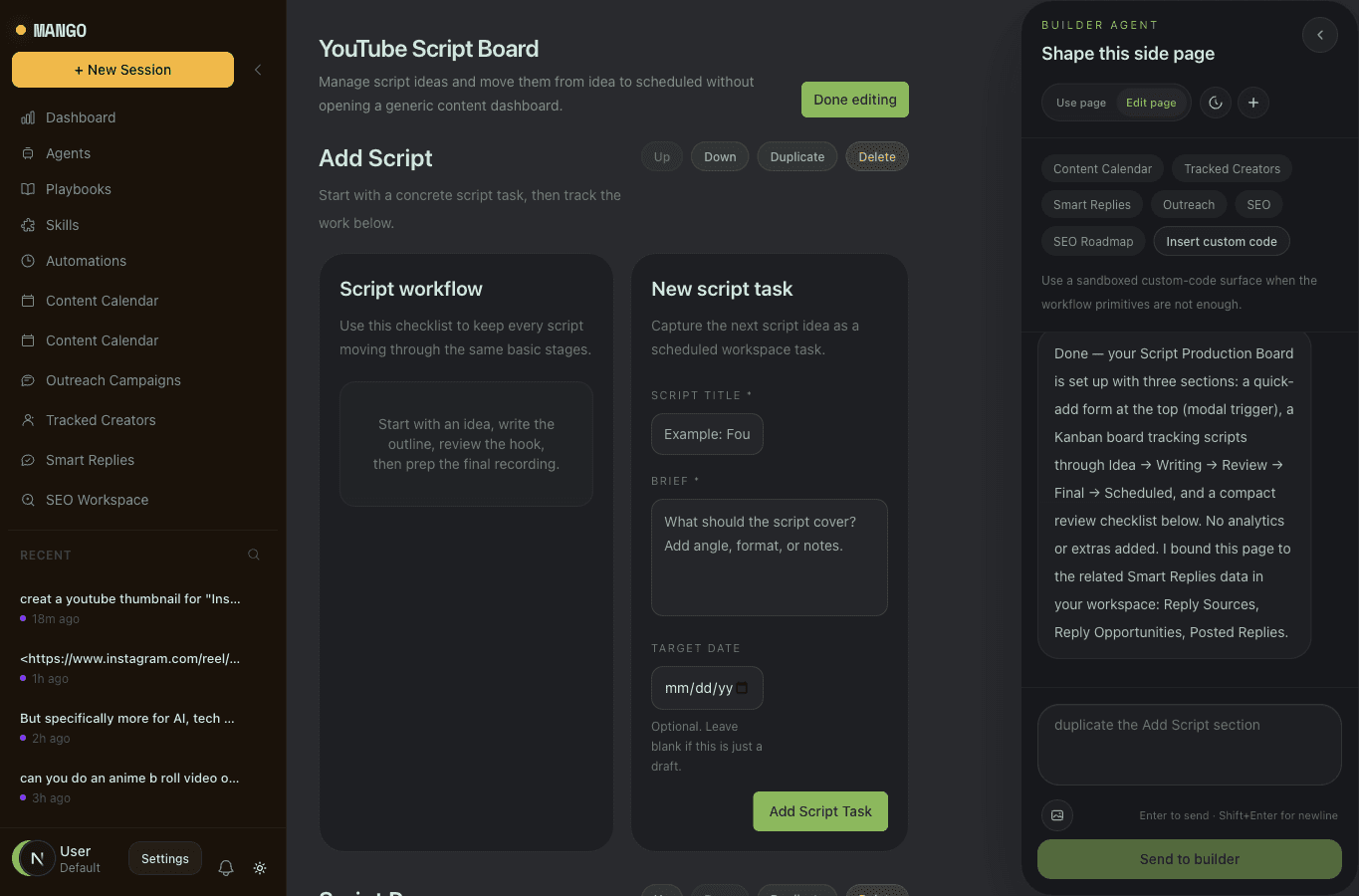
Use pages when the work has a shape: a board, a calendar, a list, a queue, or a review process.
Optional: run it all from Slack#
Connect Slack from onboarding or Settings > Connectors and you can operate your agents from a channel or DM. Mention the agent, get drafts in-thread, and approve posts without opening the app.
Slack is especially useful once you have automations running. The agent can bring approvals to where your team already talks.
What good looks like after day one#
By the end of your first session, you should have:
- One deployed agent.
- One clear brand or company source added.
- One connected social account, or a plan to connect it before publishing.
- One useful draft, video, script, or content idea set.
- One recurring automation or scheduled workflow.
That is enough. You can refine the rest as Mango learns what works.
Common first-day fixes#
The output feels too generic. Give Mango your audience, offer, strongest examples, and what you do not want. Good context beats long prompts.
You cannot publish yet. Connect at least one account and make sure the agent has access to it.
You are not sure which skill to pick. Leave the picker on Viral Max and describe the outcome. Use explicit skills later when you know exactly what format you want.
You want repeatable growth, not one-off content. Turn the winning request into an automation or a page.
What's next#
- How Mango Works - the concepts behind workspaces, agents, and sessions
- Creating Content - every content type Mango can make
- Credits & Billing - how usage and plans work